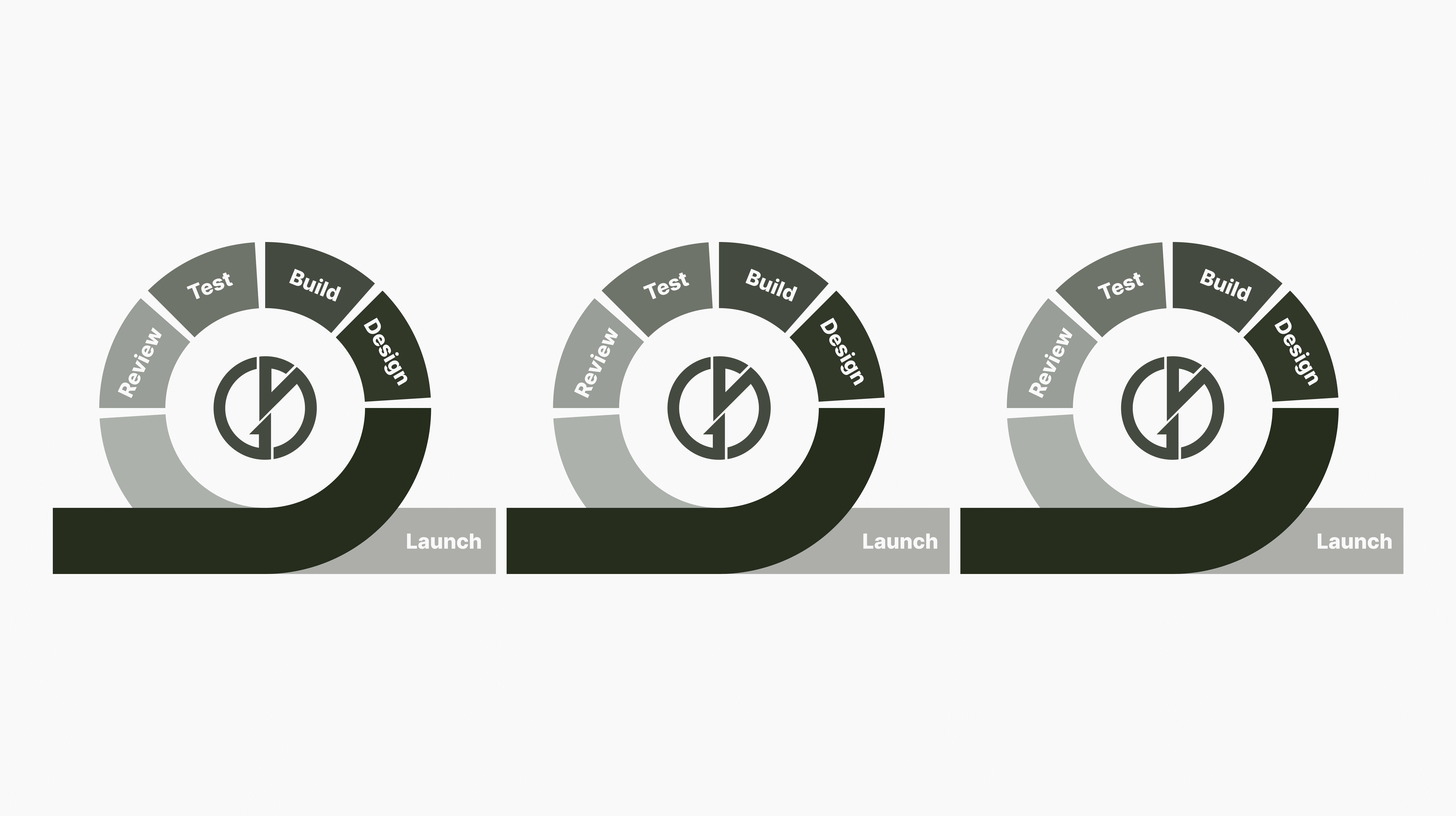
Iteration Cycle
[Overview]
The Context
As Lead UX Designer for the Coachi app, I designed and optimised a camera recording feature that enabled users to film skiing sessions for AI-powered performance analysis.
This feature required not only intuitive recording controls but also clear guidance on how to capture usable, high-quality videos for accurate model outputs.
The Context
As Lead UX Designer for the Coachi app, I designed and optimised a camera recording feature that enabled users to film skiing sessions for AI-powered performance analysis.
This feature required not only intuitive recording controls but also clear guidance on how to capture usable, high-quality videos for accurate model outputs.
The Challenge
The initial concept tested well with users, but technical constraints in the AI joint tracking model revealed a critical risk: if skiers were not filmed with sufficient zoom or correct angles, the system could return inaccurate results. The challenge was to refine the camera flow to:
Prevent recording errors.
Guide users to film in ways that improved AI model accuracy.
Maintain an intuitive and lightweight recording experience.
The Challenge
The initial concept tested well with users, but technical constraints in the AI joint tracking model revealed a critical risk: if skiers were not filmed with sufficient zoom or correct angles, the system could return inaccurate results. The challenge was to refine the camera flow to:
Prevent recording errors.
Guide users to film in ways that improved AI model accuracy.
Maintain an intuitive and lightweight recording experience.
Key Contributions
Advocated for evidence-based iteration, aligning UX design with technical model performance needs.
Translated complex AI requirements into simple, user-friendly visual aids and instructions.
Ensured usability remained intuitive while solving for accuracy-critical recording constraints.
Key Contributions
Advocated for evidence-based iteration, aligning UX design with technical model performance needs.
Translated complex AI requirements into simple, user-friendly visual aids and instructions.
Ensured usability remained intuitive while solving for accuracy-critical recording constraints.
Skills Demonstrated
UX Research & Validation:
Product Strategy Alignment
Design Process
Design Thinking
Service Design Thinking
Figma
[Impact]
Improved AI Accuracy by 25%
Redesigned the camera interface and instructional flow to align with AI model constraints, reducing poor-quality video submissions and increasing the joint tracking model’s scoring accuracy by an estimated 25%.
Cut Recording Errors by 40%
Iterative design updates—including a redesigned filming guide and instructional overlay—resulted in a 40% drop in incorrectly captured sessions.
Bridged UX and AI Engineering
Led a cross-functional design process that translated complex AI requirements into intuitive visual aids and instructions, enabling non-technical users to film with confidence and improving usability without compromising model performance.
[My Process]

1. Initial Design & Testing
Created a 3x3 grid guide to help users keep the skier centred.
Designed pop-over filming tips advising how best to capture the skier.
Validated the flow through early usability testing, which confirmed users could easily follow instructions and record videos.
1. Initial Design & Testing
Created a 3x3 grid guide to help users keep the skier centred.
Designed pop-over filming tips advising how best to capture the skier.
Validated the flow through early usability testing, which confirmed users could easily follow instructions and record videos.
2. Technical Insights from AI Development
Learned that the joint tracking model required skiers to be filmed at closer zoom levels for accuracy.
Identified that the “skiing towards the camera” approach failed to capture fore–aft balance metrics reliably.
2. Technical Insights from AI Development
Learned that the joint tracking model required skiers to be filmed at closer zoom levels for accuracy.
Identified that the “skiing towards the camera” approach failed to capture fore–aft balance metrics reliably.
3. Iterative Redesign
Grid Update:

Adapted the 3x3 grid into a larger central guide, visually nudging users to zoom in further.
Zoom Control Redesign:
Redesigned the zoom control for better visibility and precision, reducing recording errors and ensuring skiers consistently filled the frame for accurate AI analysis.
Instructional Messaging:
Replaced lightweight popovers with a full instruction sheet, combining an infographic with clear bullet points for how to record correctly.
Flow Adjustment:
Updated instructions to encourage skiers to ski past the camera instead of towards it, giving the AI a more three-dimensional perspective for accurate scoring.
3. Iterative Redesign
Grid Update:
Adapted the 3x3 grid into a larger central guide, visually nudging users to zoom in further.
Zoom Control Redesign:
Redesigned the zoom control for better visibility and precision, reducing recording errors and ensuring skiers consistently filled the frame for accurate AI analysis.
Instructional Messaging:
Replaced lightweight popovers with a full instruction sheet, combining an infographic with clear bullet points for how to record correctly.
Flow Adjustment:
Updated instructions to encourage skiers to ski past the camera instead of towards it, giving the AI a more three-dimensional perspective for accurate scoring.
[Key Learnings]
Iterate with Evidence
User testing wasn’t just validation — it drove meaningful change. Each iteration responded to real usability feedback and technical AI constraints, transforming insights into targeted improvements that boosted both model accuracy and user satisfaction.
Design is a Team Sport
Cross-functional alignment made the solution stick. By partnering with engineers and product leads early, I ensured design decisions supported technical accuracy and business goals — proving that collaborative iteration delivers lasting impact.
Translate Tech into UX
I turned complex joint-tracking requirements into intuitive guidance — from redesigned grids to infographic-based instructions — empowering users to record better videos without needing technical know-how.
Iteration Cycle
[Persona]
Jhon Roberts
Marketing Manager
Content
Age: 29
Location: New York City
Tech Proficiency: Moderate
Gender: Male
[Goal]
Quickly complete purchases without interruptions.
Trust the platform to handle her payment securely.
Access a seamless mobile shopping experience.
[Frustrations]
Long or confusing checkout processes.
Error messages that don’t explain the issue.
Poor mobile optimization that slows her down.
[My Process]
1. Initial Design & Testing
Created a 3x3 grid guide to help users keep the skier centred.
Designed pop-over filming tips advising how best to capture the skier.
Validated the flow through early usability testing, which confirmed users could easily follow instructions and record videos.
1. Initial Design & Testing
Created a 3x3 grid guide to help users keep the skier centred.
Designed pop-over filming tips advising how best to capture the skier.
Validated the flow through early usability testing, which confirmed users could easily follow instructions and record videos.
2. Technical Insights from AI Development
Learned that the joint tracking model required skiers to be filmed at closer zoom levels for accuracy.
Identified that the “skiing towards the camera” approach failed to capture fore–aft balance metrics reliably.
2. Technical Insights from AI Development
Learned that the joint tracking model required skiers to be filmed at closer zoom levels for accuracy.
Identified that the “skiing towards the camera” approach failed to capture fore–aft balance metrics reliably.
3. Iterative Redesign
Grid Update:
Adapted the 3x3 grid into a larger central guide, visually nudging users to zoom in further.
Zoom Control Redesign:
Redesigned the zoom control for better visibility and precision, reducing recording errors and ensuring skiers consistently filled the frame for accurate AI analysis.
Instructional Messaging:
Replaced lightweight popovers with a full instruction sheet, combining an infographic with clear bullet points for how to record correctly.
Flow Adjustment:
Updated instructions to encourage skiers to ski past the camera instead of towards it, giving the AI a more three-dimensional perspective for accurate scoring.
3. Iterative Redesign
Grid Update:
Adapted the 3x3 grid into a larger central guide, visually nudging users to zoom in further.
Zoom Control Redesign:
Redesigned the zoom control for better visibility and precision, reducing recording errors and ensuring skiers consistently filled the frame for accurate AI analysis.
Instructional Messaging:
Replaced lightweight popovers with a full instruction sheet, combining an infographic with clear bullet points for how to record correctly.
Flow Adjustment:
Updated instructions to encourage skiers to ski past the camera instead of towards it, giving the AI a more three-dimensional perspective for accurate scoring.
[Overview]
The Context
As Lead UX Designer for the Coachi app, I designed and optimised a camera recording feature that enabled users to film skiing sessions for AI-powered performance analysis.
This feature required not only intuitive recording controls but also clear guidance on how to capture usable, high-quality videos for accurate model outputs.
The Context
As Lead UX Designer for the Coachi app, I designed and optimised a camera recording feature that enabled users to film skiing sessions for AI-powered performance analysis.
This feature required not only intuitive recording controls but also clear guidance on how to capture usable, high-quality videos for accurate model outputs.
The Challenge
The initial concept tested well with users, but technical constraints in the AI joint tracking model revealed a critical risk: if skiers were not filmed with sufficient zoom or correct angles, the system could return inaccurate results. The challenge was to refine the camera flow to:
Prevent recording errors.
Guide users to film in ways that improved AI model accuracy.
Maintain an intuitive and lightweight recording experience.
The Challenge
The initial concept tested well with users, but technical constraints in the AI joint tracking model revealed a critical risk: if skiers were not filmed with sufficient zoom or correct angles, the system could return inaccurate results. The challenge was to refine the camera flow to:
Prevent recording errors.
Guide users to film in ways that improved AI model accuracy.
Maintain an intuitive and lightweight recording experience.
Key Contributions
Advocated for evidence-based iteration, aligning UX design with technical model performance needs.
Translated complex AI requirements into simple, user-friendly visual aids and instructions.
Ensured usability remained intuitive while solving for accuracy-critical recording constraints.
Key Contributions
Advocated for evidence-based iteration, aligning UX design with technical model performance needs.
Translated complex AI requirements into simple, user-friendly visual aids and instructions.
Ensured usability remained intuitive while solving for accuracy-critical recording constraints.
Skills Demonstrated
UX Research & Validation:
UX Research & Validation:
Product Strategy Alignment
Product Strategy Alignment
Design Process
Design Process
Design Thinking
Design Thinking
Service Design Thinking
Service Design Thinking
Figma
Figma
Timeline
Chip 1
[Key Learnings]
Iterate with Evidence
User testing wasn’t just validation — it drove meaningful change. Each iteration responded to real usability feedback and technical AI constraints, transforming insights into targeted improvements that boosted both model accuracy and user satisfaction.
Design is a Team Sport
Cross-functional alignment made the solution stick. By partnering with engineers and product leads early, I ensured design decisions supported technical accuracy and business goals — proving that collaborative iteration delivers lasting impact.
Translate Tech into UX
I turned complex joint-tracking requirements into intuitive guidance — from redesigned grids to infographic-based instructions — empowering users to record better videos without needing technical know-how.
[Impact]
Improved AI Accuracy by 25%
Redesigned the camera interface and instructional flow to align with AI model constraints, reducing poor-quality video submissions and increasing the joint tracking model’s scoring accuracy by an estimated 25%.
Cut Recording Errors by 40%
Iterative design updates—including a redesigned filming guide and instructional overlay—resulted in a 40% drop in incorrectly captured sessions.
Bridged UX and AI Engineering
Led a cross-functional design process that translated complex AI requirements into intuitive visual aids and instructions, enabling non-technical users to film with confidence and improving usability without compromising model performance.